Tax Expense Kit · educational toolkit

Know what to set aside for quarterly taxes — before the deadline picks a number for you

QuickBooks Self-Employed is gone and its replacements want $10–43 every month. This kit is one payment: an offline estimator whose math you can actually read, the 15-category expense tracker, invoice-ready income records, a mileage log, and the quarterly deadline calendar — all running on your own device. Educational estimates with sources and as-of dates — never a subscription, never a bank connection.

Get the kit — $42
One-time payment · ≈ ฿1,450 · free updates for v1.x · instant download
Instant download · 30-day refund, no questions · human reply within a day · secure checkout by Stripe
Every Zicula kit ships with its own key art — this one's yours.

What's inside the kit

One zip, no install, no account, no bank feed. Open the files and they work — the estimator runs offline in your browser, the trackers open in any spreadsheet app.

Visible math

The quarterly estimator

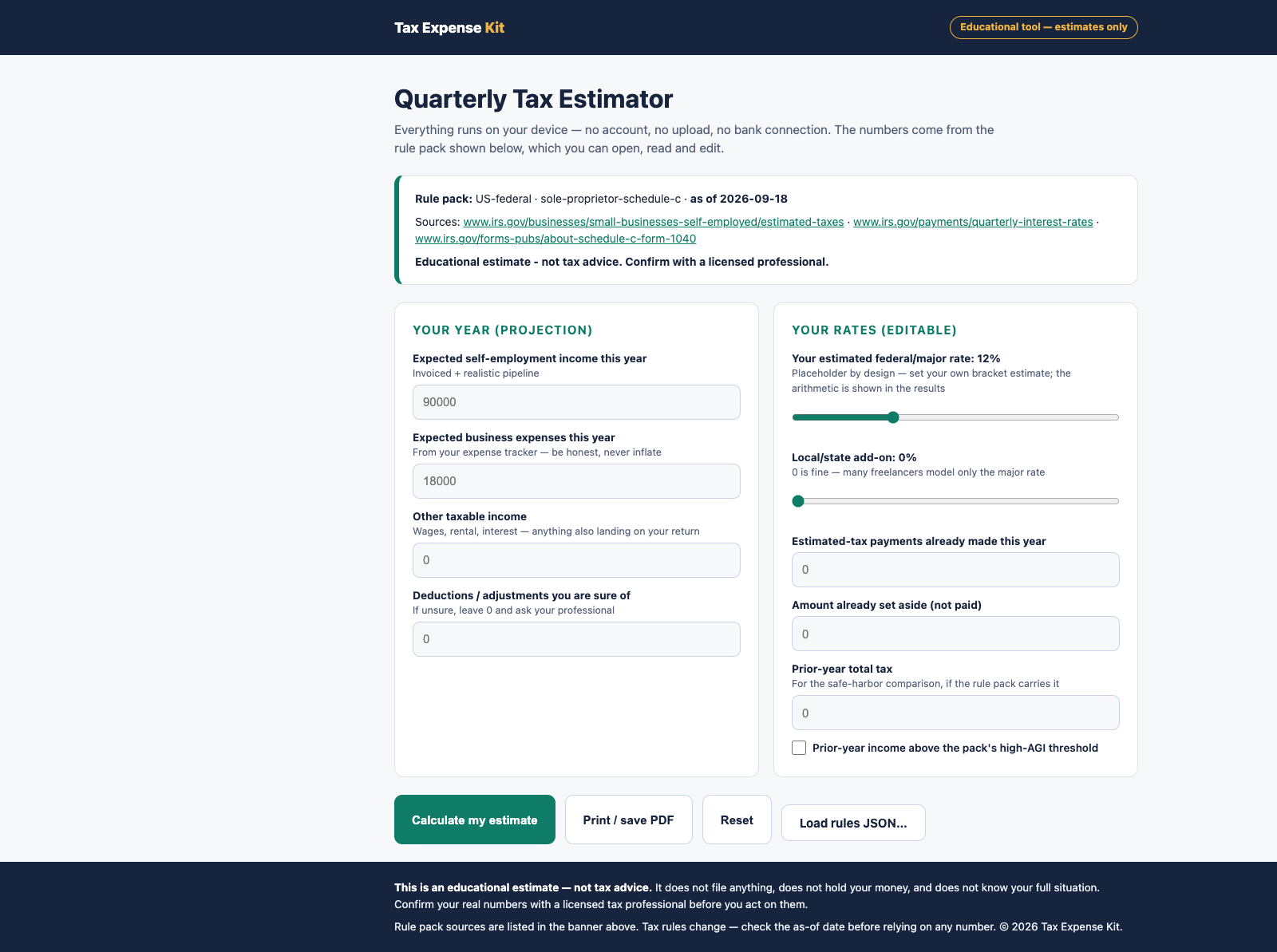
Type your projection, get the estimate: SE tax, income-tax base, per-quarter amount, the % to set aside from every invoice, the safe-harbor comparison, and what paying late costs at the pack's interest rate. Every result shows its as-of date and sources.

15 categories

Expense tracker, Schedule C style

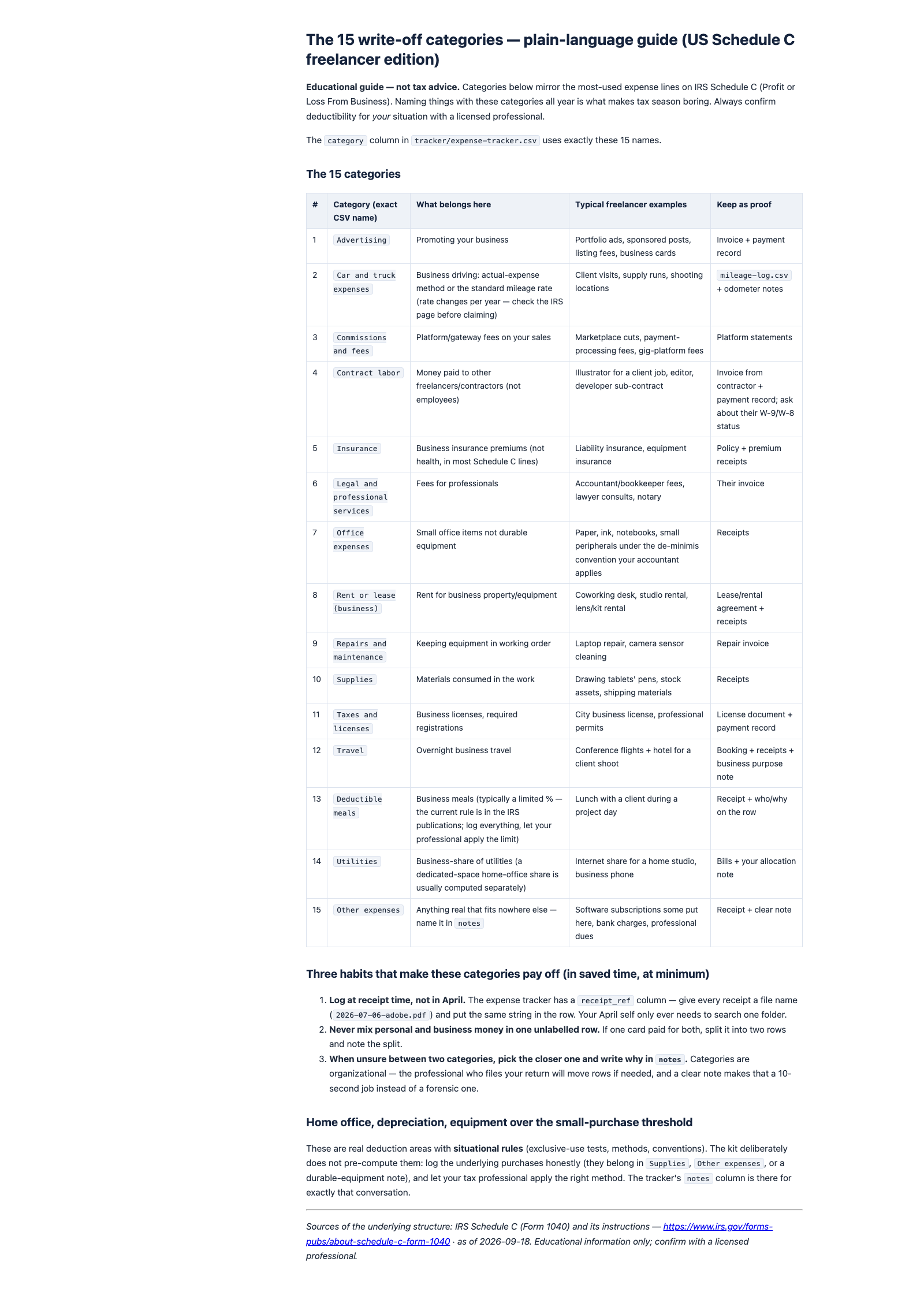
A CSV with the fifteen write-off categories freelancers actually use, a receipt-reference column, and a plain-language guide that says what belongs where — so year-end is a filter, not an archaeology dig.

Invoice-ready

Income records that reconcile

One row per invoice with issued/paid dates, currency, fees and net received — the columns a client dispute, a platform audit, or your accountant will ask for, kept as an index card instead of a shoebox.

Mileage log

Trips logged when they happen

Date, from/to, business purpose, miles — the fields that make a business trip provable months later, logged the same week so nothing gets reconstructed from memory in April.

Deadlines armed

Calendar + quarterly routine

An .ics with the four US estimated-tax deadlines (alarms at 14 and 3 days), generic quarter-close reminders, and a one-page checklist that turns "close the quarter" into thirty quiet minutes.

Open rule pack

Editable JSON, sources cited

Every threshold, rate and date lives in a readable rule pack with an as-of date and links to the official pages — plus organizer mini-packs for Germany and France with the questions to bring to a local professional.

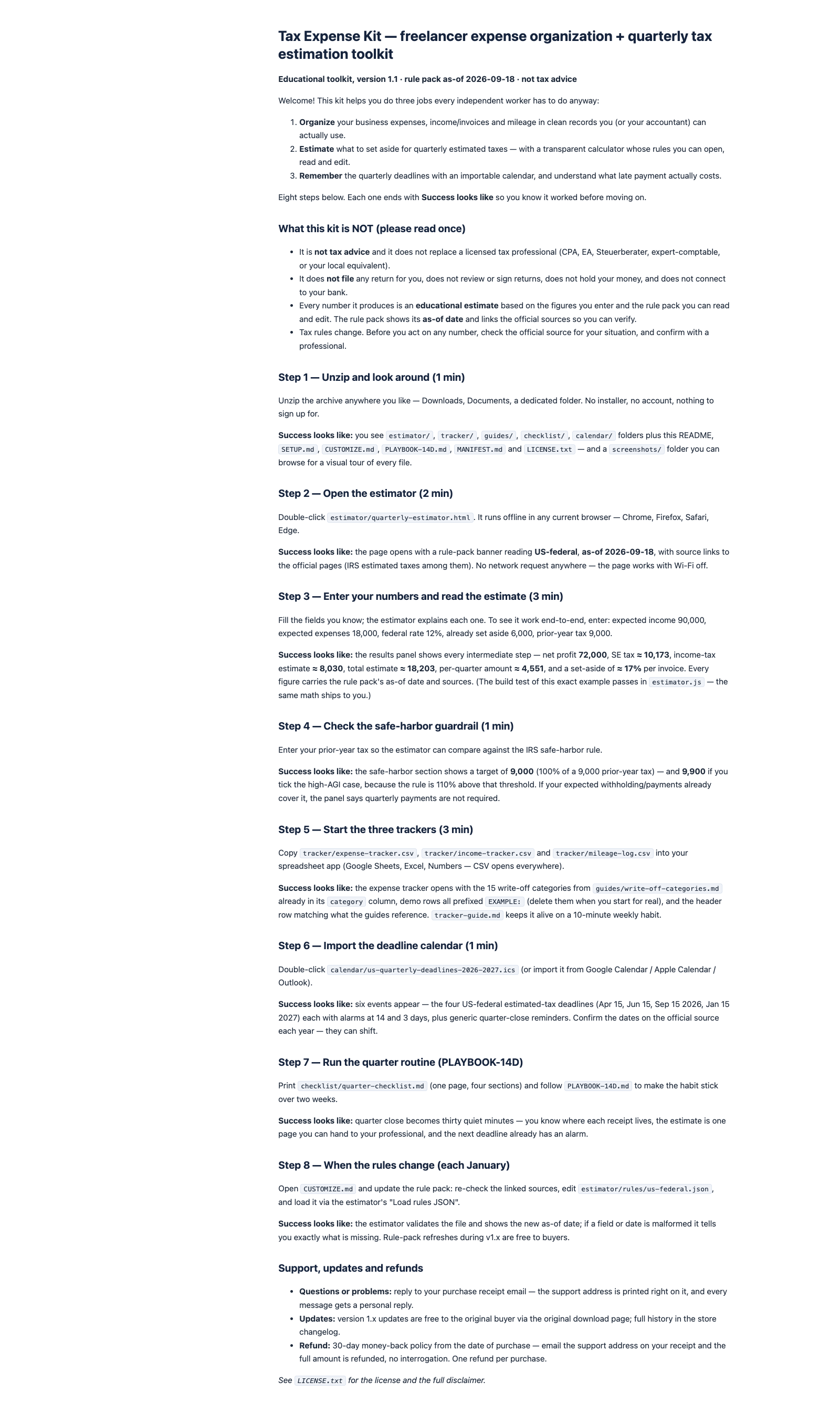
The buyer README, start here
The buyer README — start here
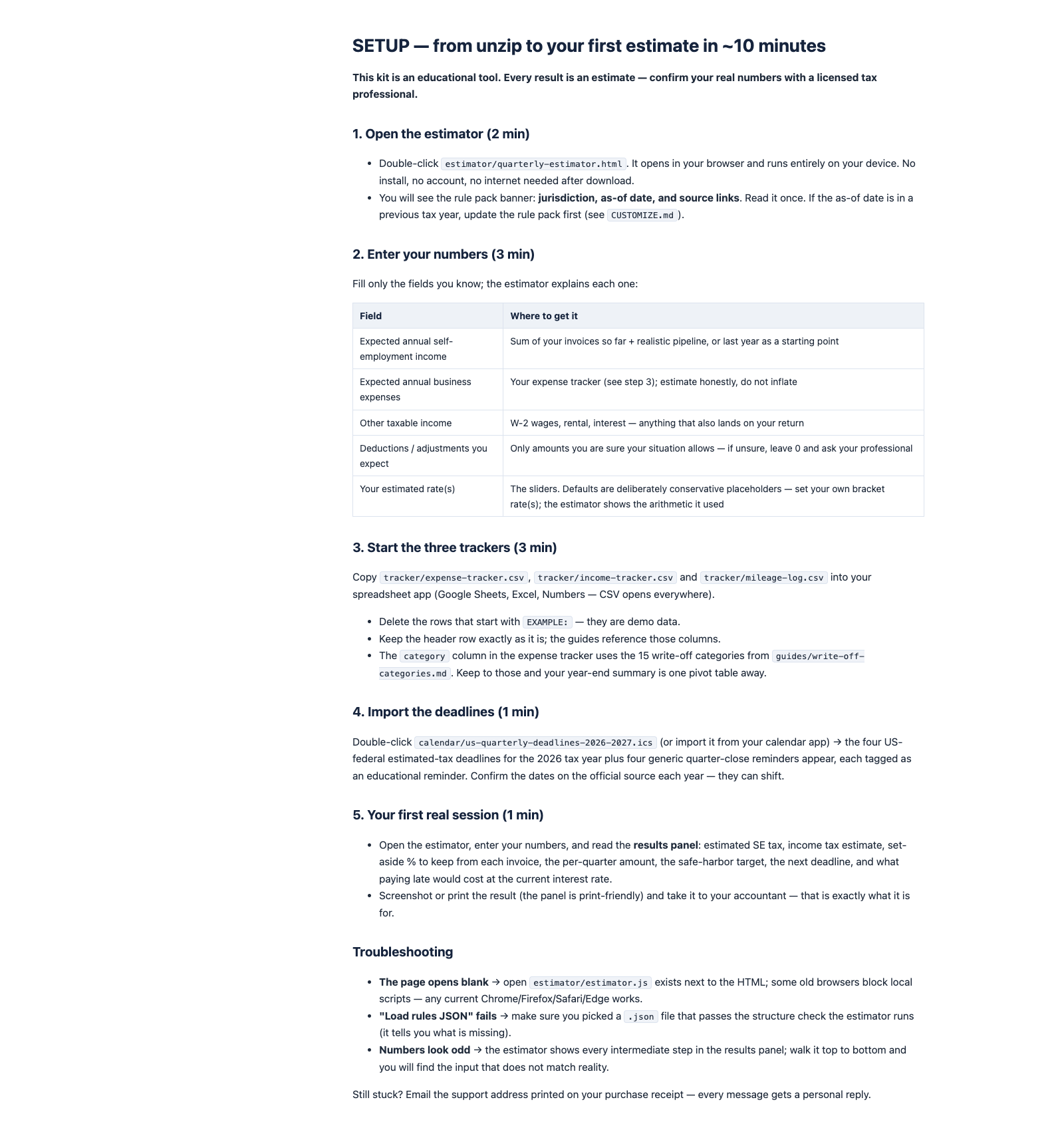
SETUP guide, first estimate in about 10 minutes
SETUP guide — first estimate in about 10 minutes
The quarterly estimator, running offline
The quarterly estimator — visible math, offline
The 15 write-off categories guide
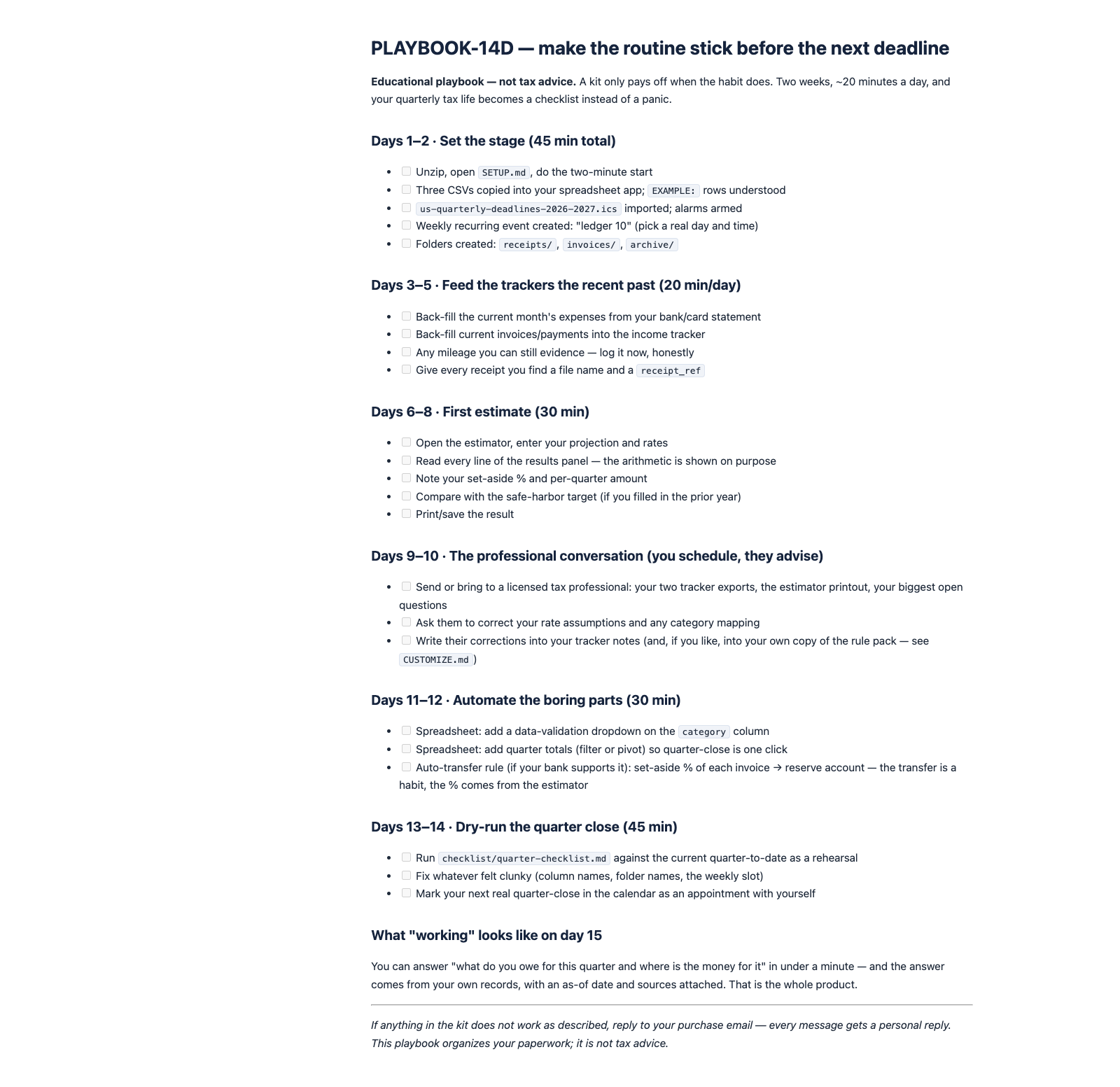
PLAYBOOK-14D, the two-week routine plan
PLAYBOOK-14D — the two-week routine plan

Real files from the zip, rendered as-is — no mockups.

Who's behind this?

Zicula is a one-person studio — hi, I'm Zic. Every kit here, including this one, is written, tested and shipped through documented process, and the support email is answered by me, not a helpdesk. This store's own build, QA and deploy pipeline runs on the same kind of SOPs and checklists we sell.

  • Free sample, instant download — no email required.
  • 30-day refund, processed in Stripe — no forms, no interrogation.
  • Free updates for v1.x — including rule-pack refreshes; full history in the store changelog.
  • Real human support: [email protected]

A tool and an education — not tax advice, and not shy about it

It estimates and organizes. It does not file, review, or sign anything. Every number is an educational estimate from the figures you enter and the rule pack you can read. The kit tells you on every result screen: confirm with a licensed professional before you act.

Your data stays on your device. No account, no upload, no bank connection — the estimator is an offline HTML file and the trackers are CSVs you keep. Nothing to leak, nothing to subscribe to, nothing that stops working when a server goes away.

Rules change, so the rules are data, not code. When a new tax year moves a date or a rate, you edit a small JSON file — the kit shows you exactly which sources to re-check. The built-in mini-packs for Germany and France deliberately carry no rates at all: those numbers belong to your local professional.

How it works

Ten minutes from unzip to your first estimate.

Step 1

Open the estimator

Double-click the HTML file — it runs offline. Read the rule-pack banner: jurisdiction, as-of date, source links. Set your rates; the defaults are conservative placeholders, on purpose.

Step 2

Feed the trackers

Copy the three CSVs into your spreadsheet app and give this week's receipts, invoices and trips their rows. Ten minutes on a fixed day — that's the whole discipline.

Step 3

Set aside, on time

Keep the estimator's % from every invoice, import the deadline calendar, and run the quarter checklist. Print the estimate and take it to your professional — that's what it's for.

One price. You own it.

No monthly plan, no per-connection fee, no subscription.

$42 one-time payment

≈ ฿1,450

  • Offline estimator + all trackers + guides + calendar
  • Editable rule pack with sources and as-of dates
  • Free updates for v1.x — including rule-pack refreshes
  • Your data never leaves your device
  • 30-day refund — one email, no interrogation

Secure checkout via Stripe · card payments · taxes calculated at checkout

Instant download · 30-day refund, no questions · human reply within a day · secure checkout by Stripe

Not sure yet? Try a free sample

Three real files from the kit, trimmed to taste: a 5-of-15 slice of the write-off categories guide, section 1 (of 4) of the printable quarter checklist, and an excerpt of the estimator's US-federal rule pack — with its as-of date and source links. Instant download — no email needed.

Frequently asked questions

Is this tax advice?

No — and the kit says so on every screen. It is an educational estimator plus record-keeping templates. It does not file returns, does not review or sign anything, and does not know your full situation. Use its numbers to organize and prepare, then confirm with a licensed tax professional before you act.

Does it connect to my bank? Where does my data go?

No connection, ever. The estimator is an offline HTML file; the trackers are CSVs that live wherever you keep them. Nothing uploads, nothing syncs, nothing to breach. You transcribe numbers from your statements — ten minutes a week is the whole price of that privacy.

Which countries does it cover?

The calculator ships with a US-federal rule pack (thresholds, SE tax, quarterly dates, safe harbor — each with an as-of date and source links) and organizer mini-packs for Germany and France that carry deadlines and preparation questions but deliberately no rates. For any jurisdiction, the rule pack is an editable JSON: verify the numbers on the official page, enter them, and the arithmetic is shown.

What happens when tax rules change?

That is why the rules are a separate, readable file. Each January (and whenever an authority changes a rate mid-year), you re-check the linked sources, update the JSON, and load it into the estimator — a fifteen-minute job the CUSTOMIZE guide walks through. v1.x rule-pack refreshes are free to buyers.

What is the refund policy?

If the kit doesn't fit how you work, email the support address within 30 days of purchase and you get a full refund — the files are yours to keep or delete. One refund per purchase; we only ask for optional feedback.

Aren't there free alternatives?

For bookkeeping, yes — and for internal alerts we'd point you at them. But the free tiers stop where this kit starts: a quarterly estimator whose math you can read, tied to records you own, with deadlines and the honest scope of what a template may say. It is one payment for the year's paperwork spine, not another subscription to cancel.

The next deadline is real. Your number for it can be too.

$42 one-time · ≈ ฿1,450 · free updates v1.x · instant download

Get the Tax Expense Kit — $42